

What’s New — 14 to 19 October 2026
Here’s what we’ve shipped across Works25 over the past six days.
1. Payment Proof Straight From the Chat (new)
Your finance team can now settle a bill without leaving WhatsApp chat monitoring.
- Proof-of-Payment Flow — Open the customer’s bills and accounts from the chat, post the payment, update the due and charge, and attach the receipt image as evidence in a single flow.
- Media Lock — Lock the proof image when you post it. Locked media cannot be deleted, stays flagged in the library and in the message metadata, and can be filtered on its own.
- Customer Identity in Chat — Sessions cache the customer name and address, with a refresh that re-syncs profile and address naming when a contact is renamed.
- Safer Upload Queue — Transaction uploads keep the profile, chat and message context, de-duplicate pending uploads and pass lock metadata through to AI scanning.
2. Payables for Process Commissions (new)
Commission earned on processes done can now become a payable voucher, with a full record of what was converted.
- Generate Payable — From the Process Listing, turn a staff member’s unconverted commission into a payable in batches; the button shows the item count and total before you commit.
- Status / PV Ref Column — Every row shows Pending PV, Converted or Ignored at a glance, right beside the commission amount.
- Ignore and Unignore — Set aside a process that should not become a payable, and bring it back later if you change your mind.
- Reassignment Safe — Reassigning a process no longer overwrites or deletes rows already converted to a PV; balancing adjustment rows keep the ledger straight.
- Deductions Handled — Negative payable rows become deductions, and combining payables transfers the PV reference instead of reverting it.
- Two New Permissions — commissionpayable and processignore decide who can generate payables and who can ignore processes.
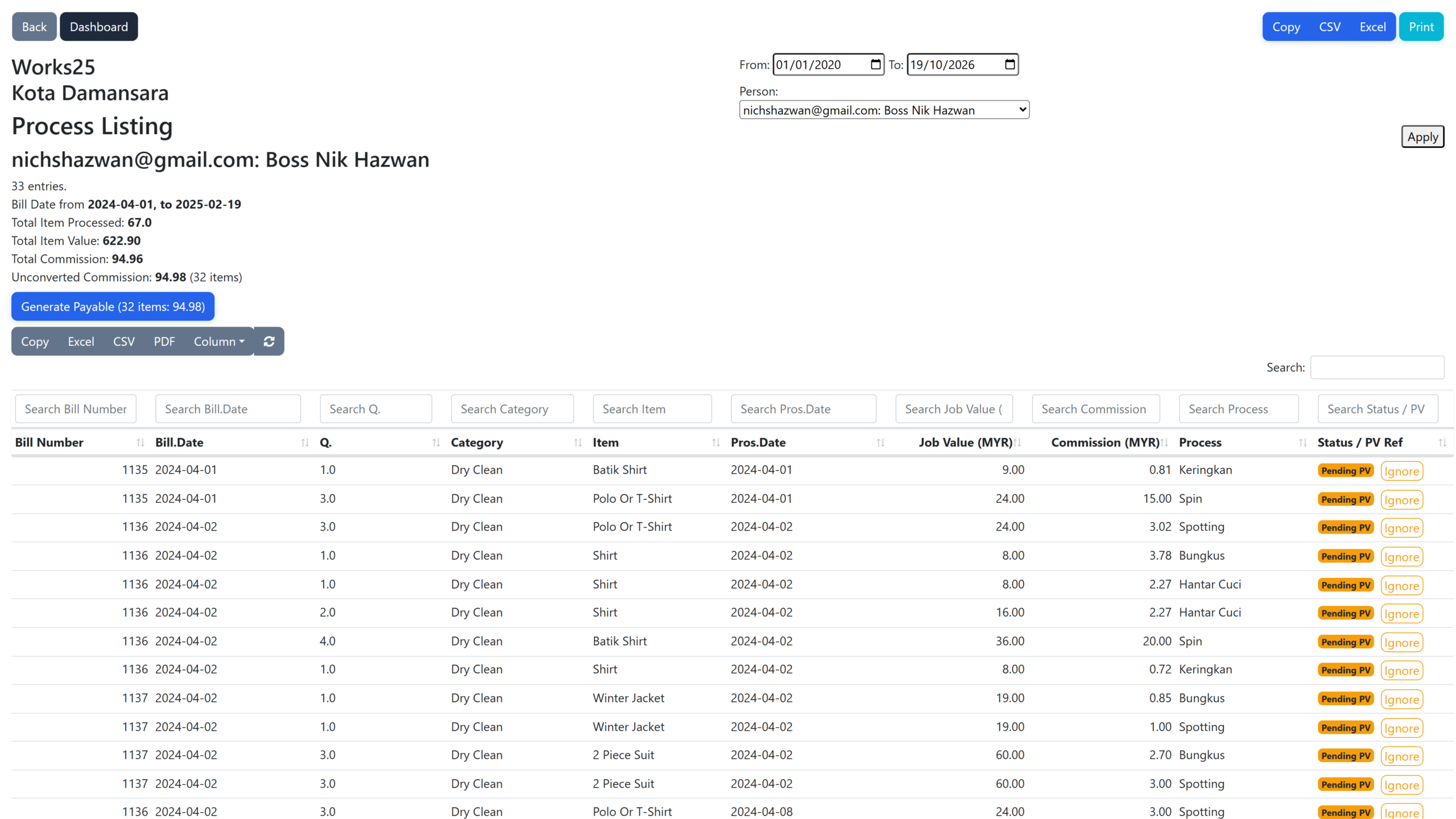
Process Listing — unconverted commission totalled per staff, with Pending PV status, Ignore actions and one Generate Payable button.
3. General Ledgers Report (new)
A proper ledger view for the whole chart of accounts.
- Every Account in One Report — Opening balance, chronological double-entry postings and closing balance for as many accounts as you select.
- Filtered to the Cent — By period, branch, account category or one specific account, with a toggle to hide zero-activity accounts.
- Export and Print — Print / PDF, Excel and CSV, linked from both the Reports and Accounts pages.
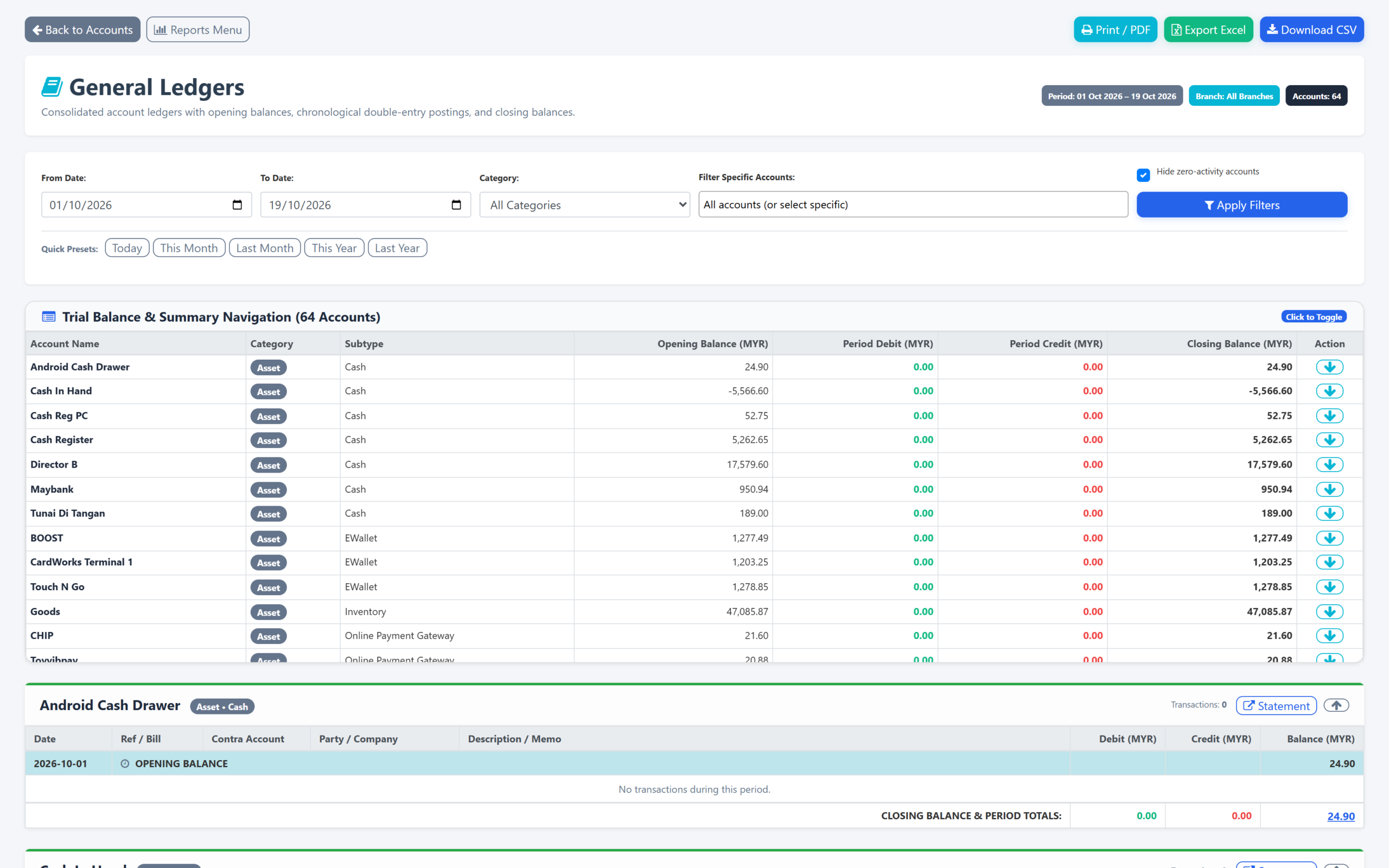
General Ledgers — trial balance across every account, opening and closing balances, and the postings behind each account.
4. Titles on Orders, Invoices and Quotations (new)
- One Optional Title — Give an order, invoice or quotation a title and it appears on receipts, invoices, delivery orders and thermal prints.
- Under Your Control — Gated by the new ordertitle permission, so you decide which roles see titles on documents.
5. Media Manager: One Picker, Bulk Actions (improved)
- One Media Picker Everywhere — Legacy file uploads and Google Drive controls give way to the Works25 Media Manager across pay vouchers, customer, profile and order images, company logos, administrative jobs, OCR entry points and the editors — URL-first fields with a picker button.
- Bulk Delete — Chat media, status images and media manager assets can be deleted in batches with progress reporting instead of one at a time, with large files queued for background removal.
6. MCP Rate Limits and a Better Correction Editor (improved)
- Per-Key Rate Limits — Set requests per minute and maximum concurrent connections for each API key; excess requests get a clear HTTP 429 with the usual headers.
- Enforced End to End — Limits apply in the MCP layer through a rate limiter and concurrency locks, streaming responses included.
- Visual Correction Editor — Chat monitoring’s correction box is now a rich editor with a raw markdown toggle, formatting toolbar, safer paste handling and better original-text recovery.
- Less Noise — Diagnostic emails are suppressed when a step is expected to sit on a different page.
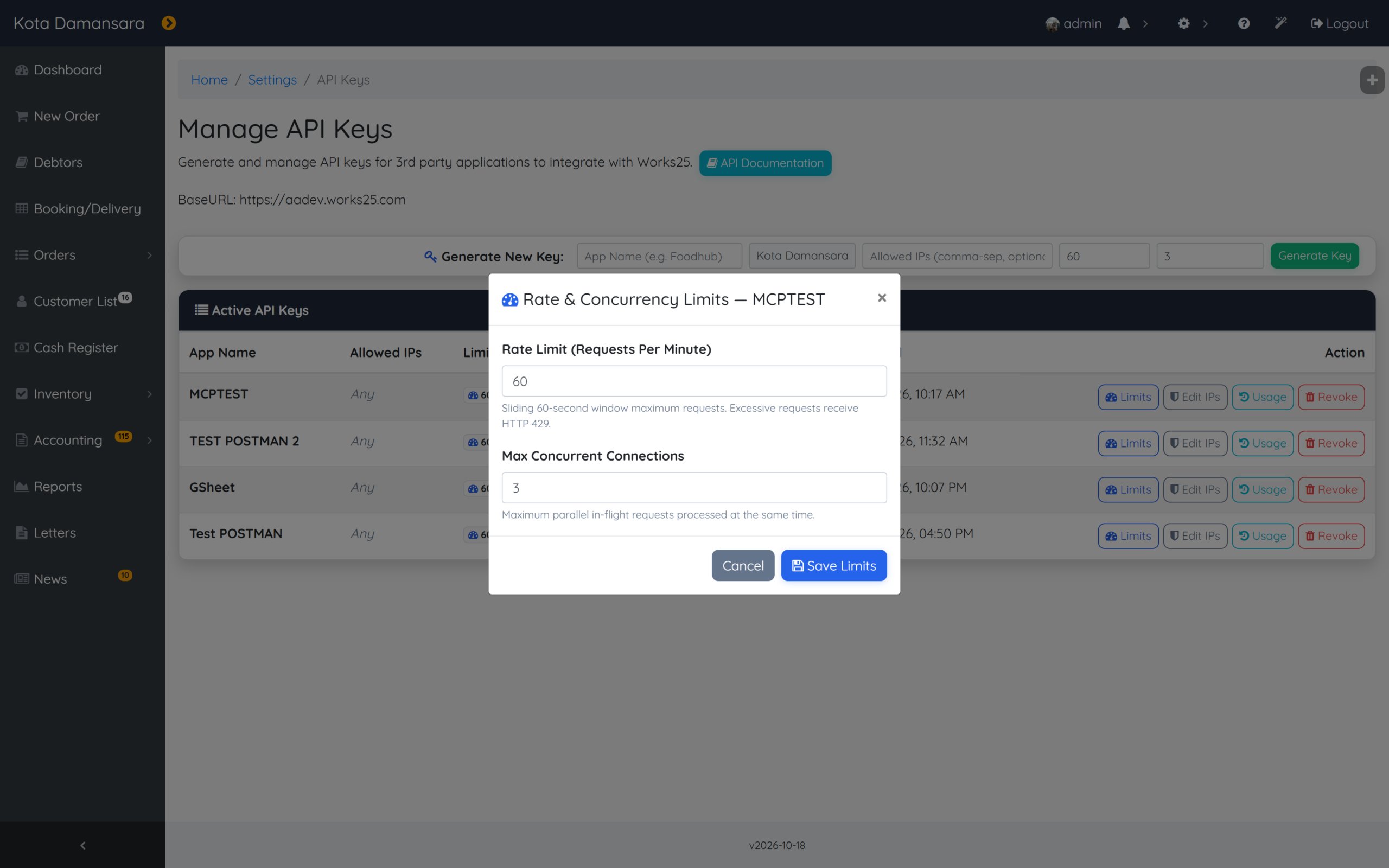
API keys — a rate limit and a concurrency ceiling per key, editable from Manage API Keys.
7. Faster Lookups, Sturdier Sessions (improved)
- One Query for New Customers — New-customer loading in taking order is a single query over profiles and addresses, backed by a new branch-and-type index.
- No Waiting on Locks — Read-only session locks are released early, so AJAX calls and pages stop queueing behind each other.
- Consistent Customer Cache — Cache metadata is built server-side in one place, so totals and timestamps are authoritative instead of reconstructed.
- Permission Requests Fixed — Requesters resolve by username again, with new indexes on permission requests and usernames.
8. Contact Identity, Goods Locations and Smaller Fixes (improved)
- One Contact Identity — WhatsApp username, then phone, then BSUID is used consistently across orders, status pages, customer list, subscriptions, registration and register search.
- Goods Locations Fixed — Add, list and delete work again under its own settingsgoodslocation permission, with duplicate and empty names rejected and queries scoped to your branch.
- Branch Rules for API Keys — MCP accounting, inventory and order calls now resolve a branch explicitly for all-branch keys and refuse to override branch-scoped keys.
- Card Payments — Failed CardWorks attempts stay on screen with a delete option and poll every five seconds, and Customer Paid is now a clear green button.
- In-App Help Kept Current — Help entries follow the new chat monitoring UI, and setting hints now say Details instead of Edit.