
Changelog
Release date scheduled on end of every month.
Update 2026-11-03

What’s New — 20 October to 3 November 2026
Here’s what we’ve shipped across Works25 over the past two weeks.
1. A Copilot That Asks Before It Acts (new)
Your AI assistant can now do real work in your account — but only after you approve the plan.
- Plan First — Ask for something that changes data and Copilot reads first, then proposes a numbered plan. Nothing is written until you say yes.
- Server-Locked Plans — The approved plan is held in your session, not in the browser. Later steps can use earlier results (address of the customer just created, total of the invoice just read).
- Permission Guard — Every step is checked against your module permissions, user level, account clearance, order-editing boundaries and branch scope before the plan is offered and again before each step runs. A blocked step tells you why instead of failing silently.
- 22 New Tools — Orders, price catalogue, accounting, inventory and administrative jobs, all behind the same guard.
- Say It Plainly — Confirm or cancel in normal language — “yes, go ahead”, “no, cancel” — no menus to learn.
- Skill Library — Opt-in playbooks per company: your own procedures matched to the question, injected only when relevant, so the assistant follows your way of working.
2. Instant Stock, Even on a Weak Line (new)
The All Items list can now run from a copy of your stock held on the device itself.
- Local Cache / Online Server — One switch on the inventory page. Local Cache searches, sorts, filters and pages instantly with no round trip; Online Server reads live.
- Delta Sync — A full sync first, then only changes. Opening a single item or picking it in a new order refreshes just that SKU.
- Self-Healing — A cold or stale cache detects itself and rebuilds, and new app versions load their own fresh scripts — no more hard refresh after an update.
- Edits Feel Immediate — Changes show on screen straight away and reconcile with the server in the background.
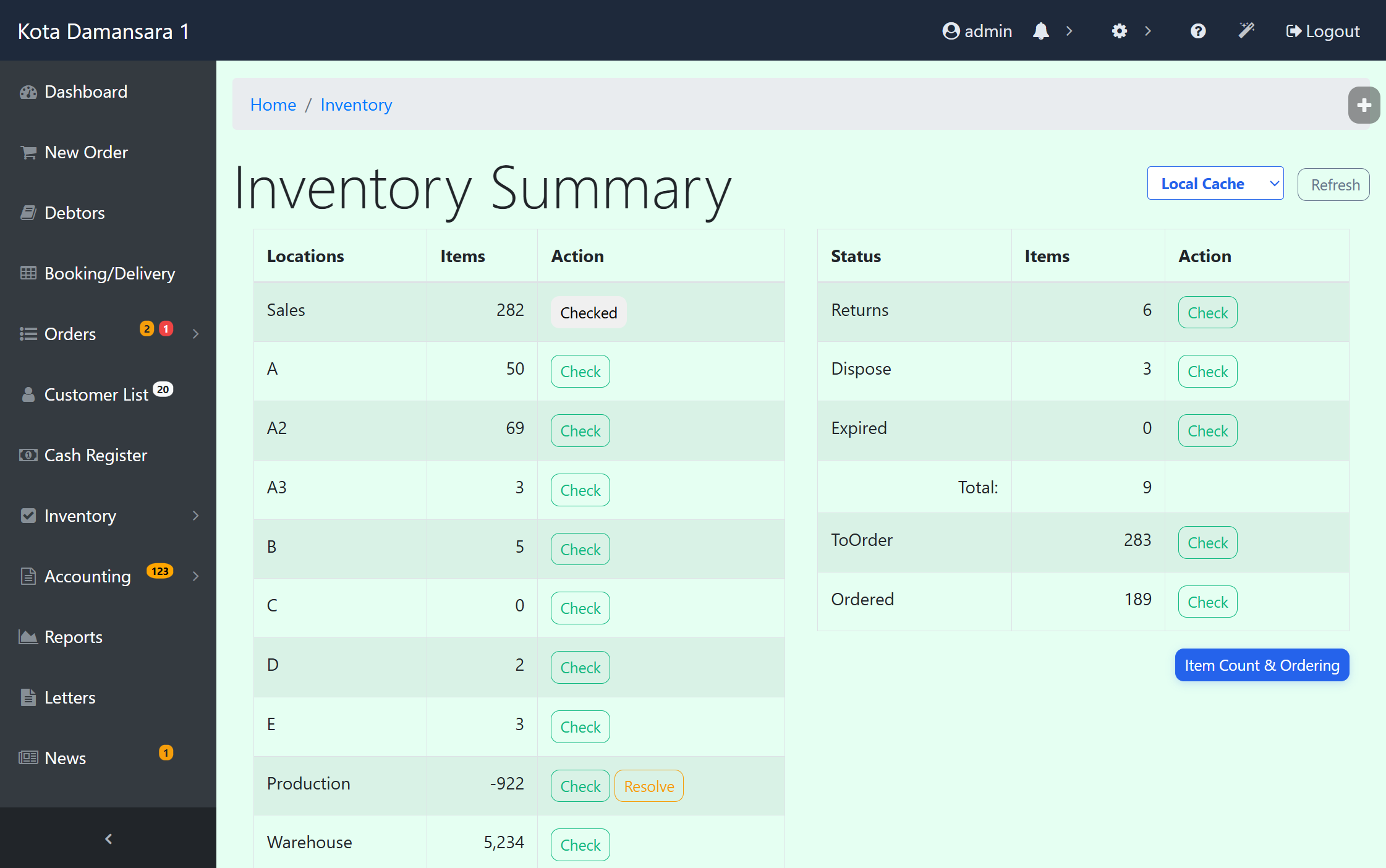
Inventory Summary — Instant client-side IndexedDB caching with Local Cache / Online Server toggle and background delta reconciliation.
3. WhatsApp AI Never Runs Out Quietly (new)
- Two Warning Lines — Under 500 AI points you get an email and a web notification; under 200 points auto-reply pauses and you get a second, louder alert.
- Banner in Chat Monitoring — The balance stays visible while you work the queue, so nobody discovers a paused assistant from an angry customer.
- Top Up From the Alert — One button takes you straight to buying points, and alerts are throttled per branch so an unrecharged balance doesn’t flood the inbox.
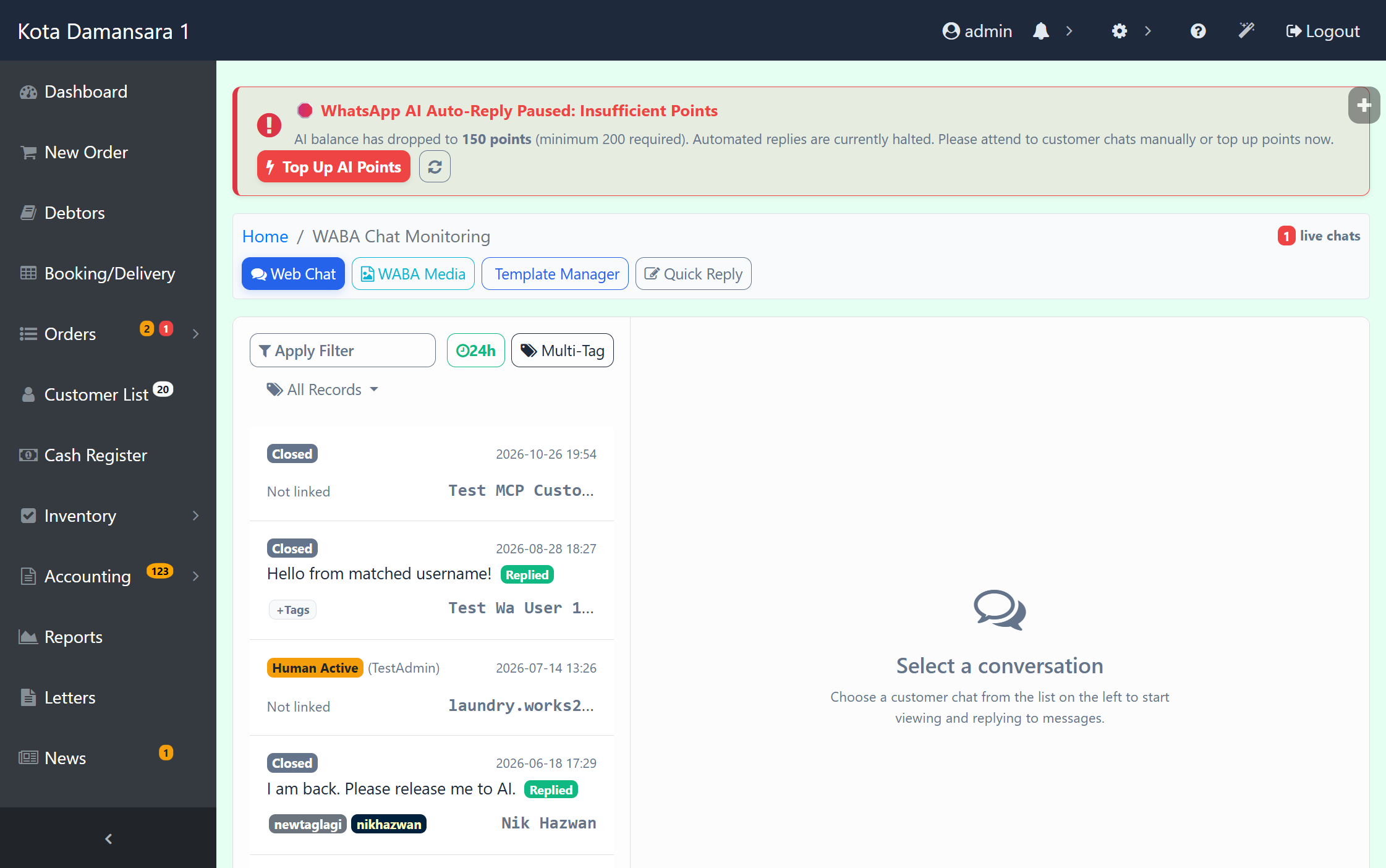
WABA Chat Monitoring — Real-time AI points monitor with warning and auto-reply pause banner and 1-click Top Up shortcut.
4. Overnight Shifts, Sorted (new)
- Shift Splits at Midnight — A clock-out before 08:00 with an evening shift still open from yesterday now caps yesterday at 23:59:59 and starts today at 00:00:00. Hours land on the right day and the right payroll period.
- Visible Splits — Split rows are highlighted in punch cards and flagged in the attendance data, so the hours can be audited at a glance.
- Clock-In Rules — Staff login gains a verification step and an extra IN3 / OUT3 slot, and clocking in again while an overnight shift is open is blocked.
- Cleaner Input Everywhere — A shared input sanitiser trims stray spaces, strips invisible zero-width characters, lowercases email addresses and blocks quote-replacement attacks across the whole app.
5. Honeypots, Passkeys and a Tighter Session (new)
- Zero-Database Honeypot — Requests for files that should not exist (WordPress, Laravel and other CMS paths) get an instant 403 and a structured log line. Plesk Fail2ban reads that line and bans the address at the firewall — without a single database query, so bot floods can’t slow the app.
- Passkeys Verified — WebAuthn assertions are now checked properly — challenge, signature and credential ID — challenges are single-use, and only a signed-in staff session can register a passkey.
- Passwords Hashed — Users created by AI tools, e-invoice profiles and customer signups are stored with password_hash instead of plain text.
- Request Variables Locked — A POST/REQUEST blacklist stops form keys from overwriting permission, user level, admin, branch or record-filter variables.
- Harder Logins — Session ID is regenerated on login, repeated failures are counted and locked out, and post-login redirects are sanitised. Legacy files, including a test mailer with hardcoded credentials, are gone.
6. Webhooks and API Docs for Integrators (new)
- API Reference Inside the MCP Server — List endpoints, read the documentation for one endpoint, or pull the whole Postman collection, straight from your AI tool of choice.
- Webhook Self-Service — Create, update, list and delete webhook configurations, read delivery logs and fire a live test event without asking us.
- Richer Events — order.edited now carries the full order and customer fields, and job.imageuploaded includes the item, so your integrations get what they actually need.
- Quotations in the Orders API — List, read, create, update, convert and delete quotations and bookings over the API. Conversion keeps inventory placeholders uncommitted, flips them to Sales as they are committed, and preserves deposits already taken.
- More Mutable Fields — Title, pickup date and time, runner, reference, promo code, tags and delivery — plus a search filter and title sort on the order list.
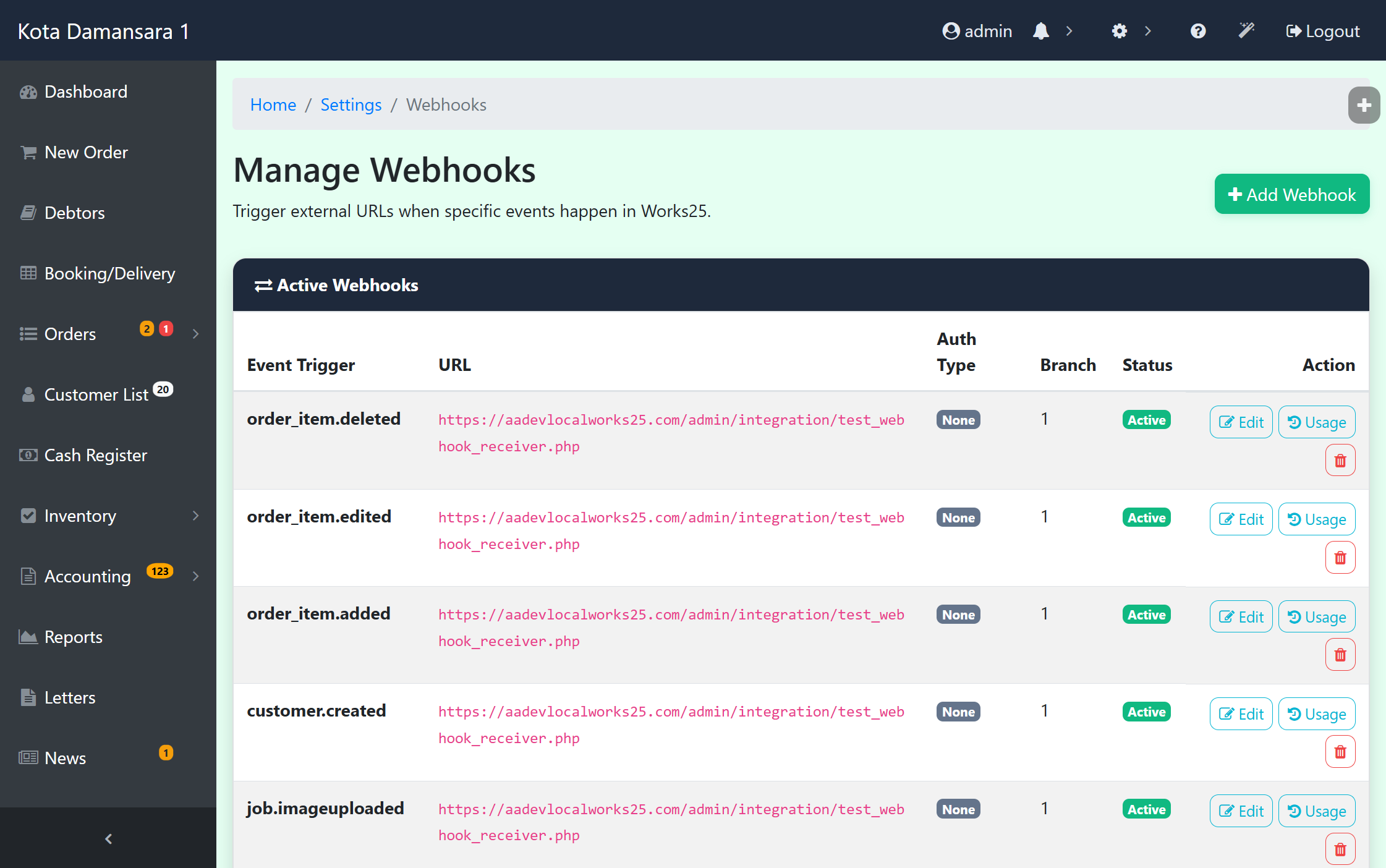
Webhook Management — Self-service subscription hub supporting order, customer, and production job triggers with live test execution.
7. Every Photo You’ve Ever Received (new)
- Other Sources Tab — The media uploader now browses WhatsApp media, order photos and item images in one place, with search, type filters, lazy-loaded paging and multi-select. Google Drive is still there as a sub-tab.
- Pick From the Record — Attach evidence, logos, proofs or item pictures without leaving the record you are editing.
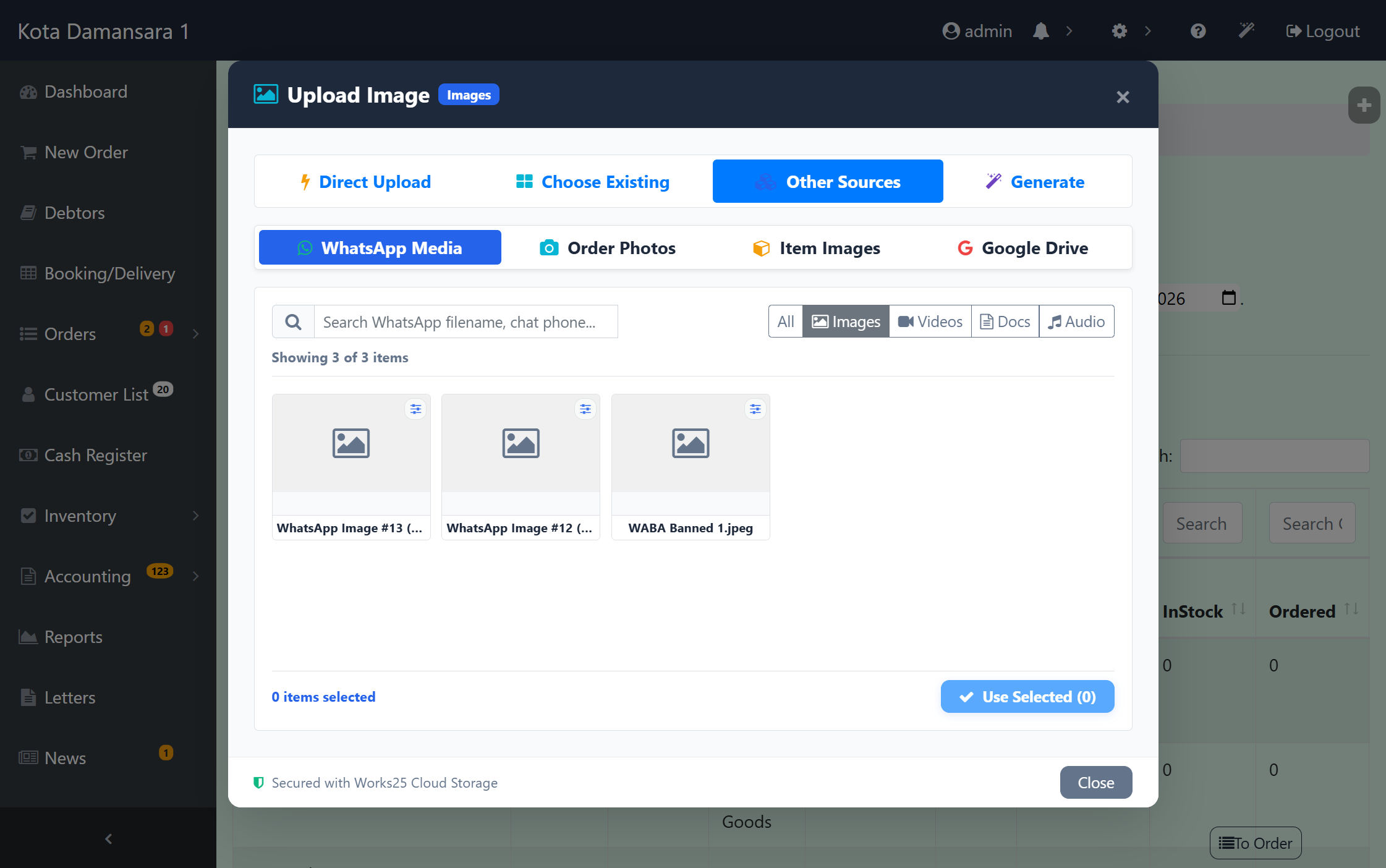
Works25 Media Uploader — Unified multi-source browser bringing WhatsApp attachments, job evidence, and catalog images into one picker.
8. A Storefront That Gets Found, Guides That Teach (new)
- Real Page SEO — Every public page gets its own title, description, canonical URL and social tags. Previously each layout wrote the site title over your page title.
- Per-Page Control — Set the SEO title and switch a page to noindex from the page editor, no theme file edits.
- Sitemap and Robots — A dynamic sitemap.xml and robots.txt at clean URLs, and the home page’s long /page/ address now 301s to the root.
- Procedural Guides — Help topics can carry prerequisites, the outcome and the permissions needed. Search indexes them, and Copilot answers with structured steps instead of a paragraph.
9. Faster Days, Fewer Surprises (improved)
- Session Locks Released — Order list and session checks no longer hold the PHP session lock, so concurrent tabs, AJAX calls and background polling stop queueing behind each other. The notification API error is fixed too.
- Logins Land Where They Should — Post-login redirects are normalised so a relative path can no longer 404, and the navbar brand updates correctly after a branch change without reload loops.
- Sales Orders Reconciled — Converting or duplicating a quotation keeps uncommitted goodmove placeholders in step with the branch and the active account, back-fills anything missing at checkout and leaves deposits intact.
- Permission Requests That Wait — Approved requests now stay valid for 24 hours instead of 30 minutes, and the 168-hour cap on temporary grants is gone.
- Media and Camera Polish — Bulk deletion across chat media, status images and the media manager, camera Page Up / Page Down resolved to the right job and group, and document logos fixed wherever they were built by hand.
Already on Works25? Most of these are live on your account now. Ask Copilot “what changed this month?” for the short version.
Update 2026-10-19

What’s New — 14 to 19 October 2026
Here’s what we’ve shipped across Works25 over the past six days.
1. Payment Proof Straight From the Chat (new)
Your finance team can now settle a bill without leaving WhatsApp chat monitoring.
- Proof-of-Payment Flow — Open the customer’s bills and accounts from the chat, post the payment, update the due and charge, and attach the receipt image as evidence in a single flow.
- Media Lock — Lock the proof image when you post it. Locked media cannot be deleted, stays flagged in the library and in the message metadata, and can be filtered on its own.
- Customer Identity in Chat — Sessions cache the customer name and address, with a refresh that re-syncs profile and address naming when a contact is renamed.
- Safer Upload Queue — Transaction uploads keep the profile, chat and message context, de-duplicate pending uploads and pass lock metadata through to AI scanning.
2. Payables for Process Commissions (new)
Commission earned on processes done can now become a payable voucher, with a full record of what was converted.
- Generate Payable — From the Process Listing, turn a staff member’s unconverted commission into a payable in batches; the button shows the item count and total before you commit.
- Status / PV Ref Column — Every row shows Pending PV, Converted or Ignored at a glance, right beside the commission amount.
- Ignore and Unignore — Set aside a process that should not become a payable, and bring it back later if you change your mind.
- Reassignment Safe — Reassigning a process no longer overwrites or deletes rows already converted to a PV; balancing adjustment rows keep the ledger straight.
- Deductions Handled — Negative payable rows become deductions, and combining payables transfers the PV reference instead of reverting it.
- Two New Permissions — commissionpayable and processignore decide who can generate payables and who can ignore processes.
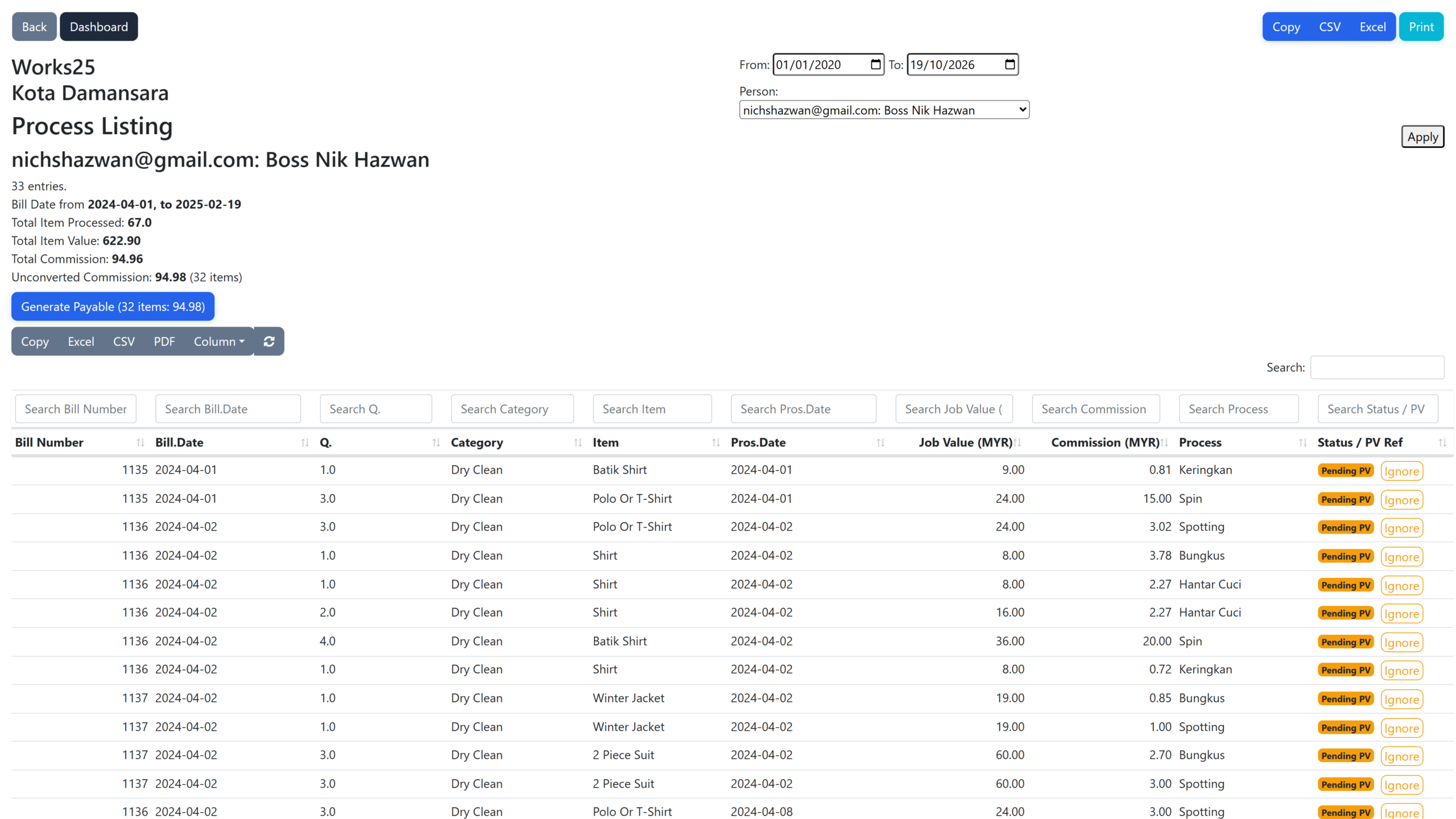
Process Listing — unconverted commission totalled per staff, with Pending PV status, Ignore actions and one Generate Payable button.
3. General Ledgers Report (new)
A proper ledger view for the whole chart of accounts.
- Every Account in One Report — Opening balance, chronological double-entry postings and closing balance for as many accounts as you select.
- Filtered to the Cent — By period, branch, account category or one specific account, with a toggle to hide zero-activity accounts.
- Export and Print — Print / PDF, Excel and CSV, linked from both the Reports and Accounts pages.
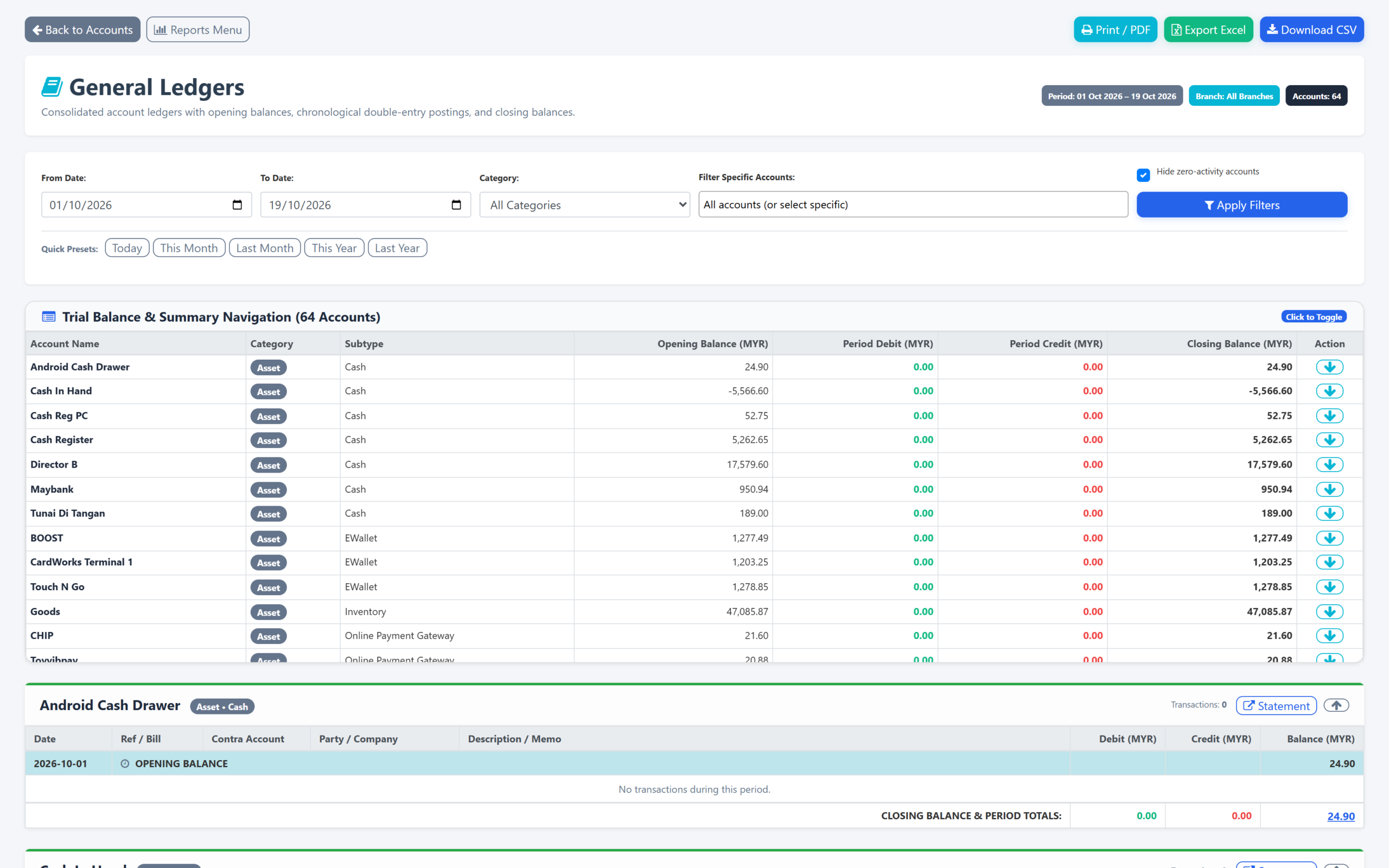
General Ledgers — trial balance across every account, opening and closing balances, and the postings behind each account.
4. Titles on Orders, Invoices and Quotations (new)
- One Optional Title — Give an order, invoice or quotation a title and it appears on receipts, invoices, delivery orders and thermal prints.
- Under Your Control — Gated by the new ordertitle permission, so you decide which roles see titles on documents.
5. Media Manager: One Picker, Bulk Actions (improved)
- One Media Picker Everywhere — Legacy file uploads and Google Drive controls give way to the Works25 Media Manager across pay vouchers, customer, profile and order images, company logos, administrative jobs, OCR entry points and the editors — URL-first fields with a picker button.
- Bulk Delete — Chat media, status images and media manager assets can be deleted in batches with progress reporting instead of one at a time, with large files queued for background removal.
6. MCP Rate Limits and a Better Correction Editor (improved)
- Per-Key Rate Limits — Set requests per minute and maximum concurrent connections for each API key; excess requests get a clear HTTP 429 with the usual headers.
- Enforced End to End — Limits apply in the MCP layer through a rate limiter and concurrency locks, streaming responses included.
- Visual Correction Editor — Chat monitoring’s correction box is now a rich editor with a raw markdown toggle, formatting toolbar, safer paste handling and better original-text recovery.
- Less Noise — Diagnostic emails are suppressed when a step is expected to sit on a different page.
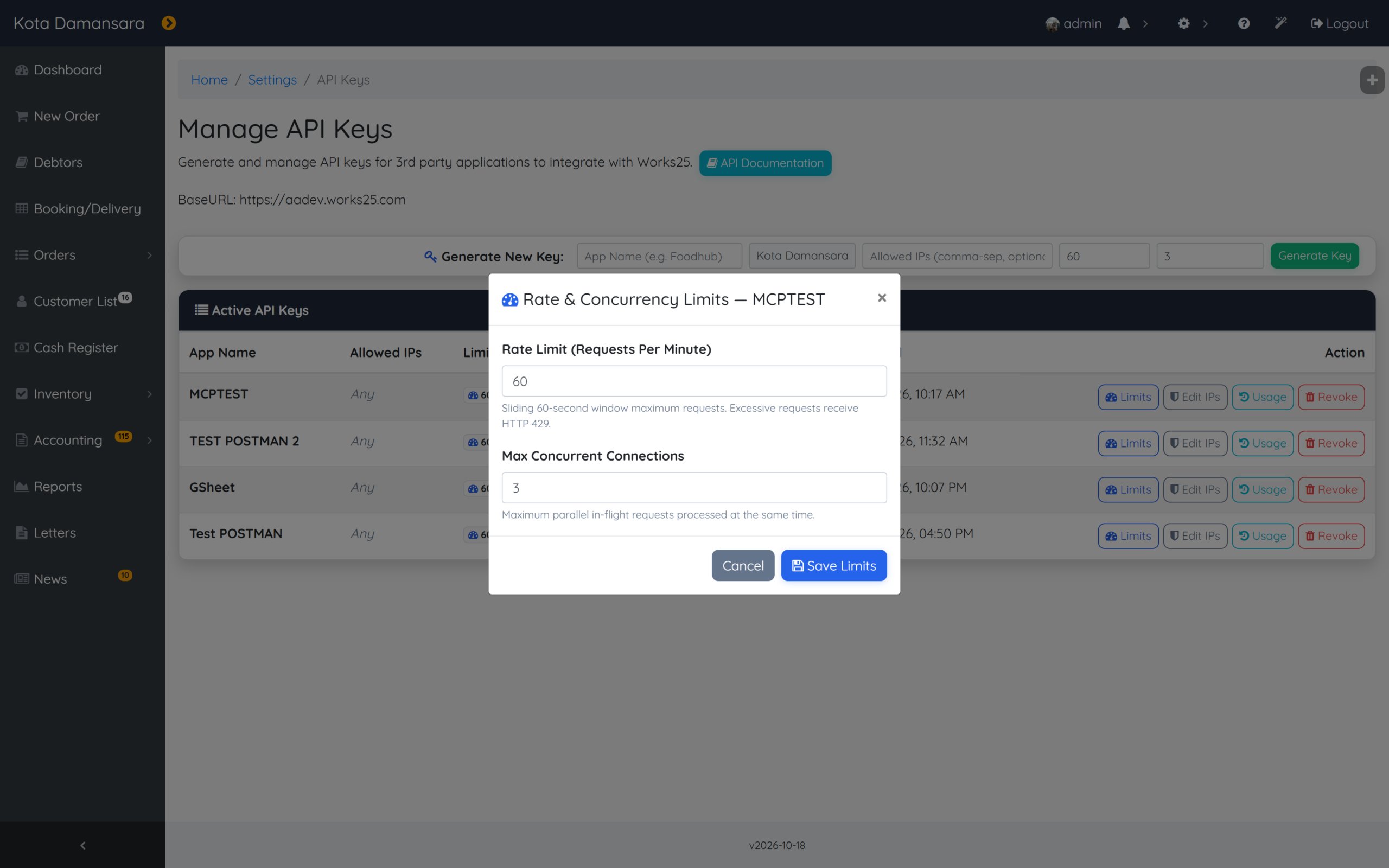
API keys — a rate limit and a concurrency ceiling per key, editable from Manage API Keys.
7. Faster Lookups, Sturdier Sessions (improved)
- One Query for New Customers — New-customer loading in taking order is a single query over profiles and addresses, backed by a new branch-and-type index.
- No Waiting on Locks — Read-only session locks are released early, so AJAX calls and pages stop queueing behind each other.
- Consistent Customer Cache — Cache metadata is built server-side in one place, so totals and timestamps are authoritative instead of reconstructed.
- Permission Requests Fixed — Requesters resolve by username again, with new indexes on permission requests and usernames.
8. Contact Identity, Goods Locations and Smaller Fixes (improved)
- One Contact Identity — WhatsApp username, then phone, then BSUID is used consistently across orders, status pages, customer list, subscriptions, registration and register search.
- Goods Locations Fixed — Add, list and delete work again under its own settingsgoodslocation permission, with duplicate and empty names rejected and queries scoped to your branch.
- Branch Rules for API Keys — MCP accounting, inventory and order calls now resolve a branch explicitly for all-branch keys and refuse to override branch-scoped keys.
- Card Payments — Failed CardWorks attempts stay on screen with a delete option and poll every five seconds, and Customer Paid is now a clear green button.
- In-App Help Kept Current — Help entries follow the new chat monitoring UI, and setting hints now say Details instead of Edit.
Update 2026-10-13

What’s New — 3 to 13 October 2026
Here’s what we’ve shipped across Works25 over the past ten days.
1. Supplier-Aware WhatsApp AI (new)
Your WhatsApp assistant now understands the other side of the business — your vendors.
- Vendor Verification — Works25 verifies supplier contacts in chat, so you can tell a real vendor from an unknown number at a glance.
- Payables & Purchase Orders on Demand — The assistant can pull supplier payables and purchase orders or debit notes straight into the conversation.
- Vendor Badges in Chat Monitoring — Verified vendor conversations are marked in the chat list.
- Session-Level Vendor Cache — Repeat lookups about the same supplier answer instantly instead of re-querying every time.
- Richer Business Profile — Prompts and tool descriptions now carry your TIN, MSIC code and business activity, so AI answers about your own company are accurate.
2. Official Letters: AI Drafting, Archiving & Short IDs (new)
- Deep-Context Drafting — AI letter assist now receives full sender and recipient context: profile, bills, payables, staff attendance, performance, claims and commissions. Recipient search also surfaces business and linked-staff details.
- Archive & Unarchive — Official letters gain an archive lifecycle with filters, status badges and API actions, so older correspondence stays out of the way without being deleted.
- Concise Letter IDs — New letters get tidy 10-character reference IDs instead of long UUIDs, and you can still set your own up to 36 characters. Renaming a letter cascades to its linked signatories.
- Sign Inside the Editor — Signatory positions auto-resolve from your staff records, and letters can be signed directly in the editor with position data shown consistently.
- Letter Tools for AI Agents — Six MCP tools plus a resource let agents create, update, list, fetch, archive and manage signatories on official letters.
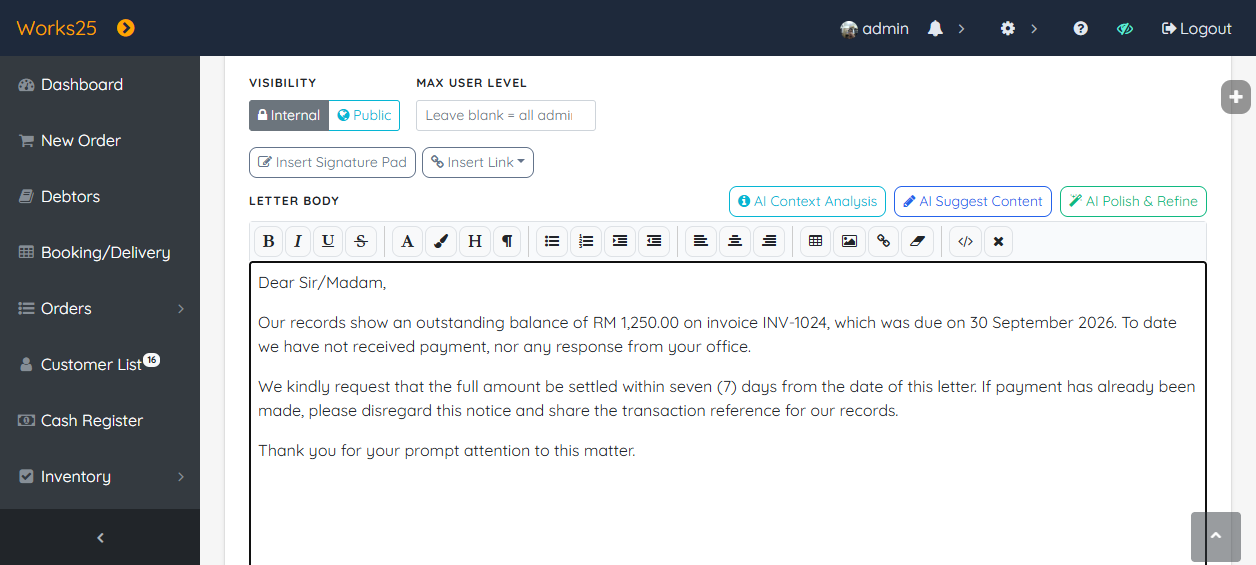
The official letter editor — draft with AI Context Analysis, AI Suggest Content and AI Polish & Refine.
3. Customer Profile Address Migration (new)
- Merge a Profile Into an Address — Move a standalone customer profile into another profile’s alternative address: search, reassign the records, merge points and clean up, all in one flow.
- WhatsApp Finds Address-Linked Customers — The WhatsApp receiver now resolves contacts through profile addresses as well as profiles, reusing verified identity checks so address-linked contacts are matched correctly.
- Safer Profile Editing — Normalised usernames, guarded points updates, and better logging and connection teardown.
4. Booking Lead Times Enforced Everywhere (improved)
Your earliest-bookable rules now hold everywhere a slot can be chosen.
- One Rule, Two Channels — Booking lead days, lead minutes and service cut-off time are applied in both WhatsApp slot checks and the public booking page.
- Clear Earliest-Date Messaging — Past or too-early dates are blocked with an explicit earliest-date message, and same-day advance notice is rounded to 15-minute slots.
- No Invalid Auto-Selection — The booking page loads lead minutes, clamps selectable dates and no longer auto-picks a slot that fails validation.
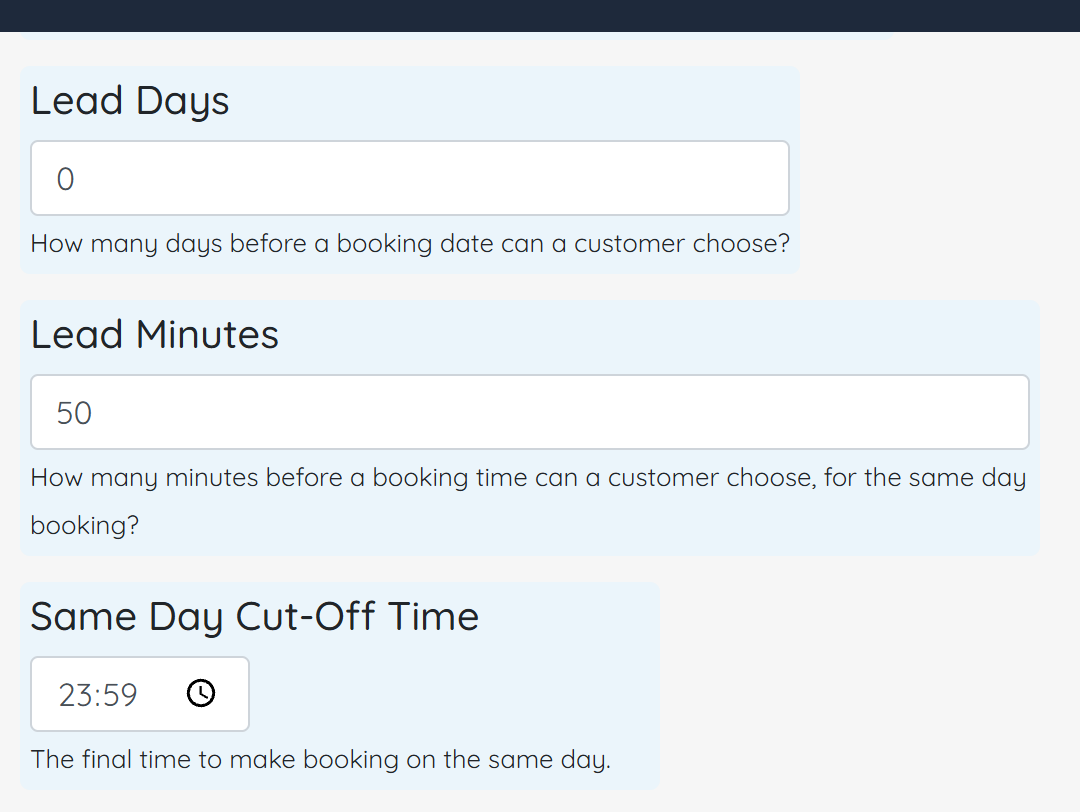
Booking lead time — lead days, lead minutes and the same-day cut-off, applied in WhatsApp slot checks and on the public booking page.
5. Choose Your AI Engine — MiMo Joins Works25 (new)
- MiMo Provider Support — MiMo V2.6 Pro is now available alongside DeepSeek and Gemini, with thinking controls for reasoning-heavy work.
- Purpose-Based Model Selection — Model choice is centralised by purpose, and chat, sales and scan flows all follow the engine you selected.
- Transparent Copilot Rates — Paid Copilot model rates are aligned between the backend and the pricing shown to you on screen.
6. A Much Bigger MCP & Integration Surface (new)
More of Works25 is now drivable by AI agents.
- Uploads & Attachments — New tools for file and media uploads, and for attaching artwork, proofs and documents to an order.
- Create Inventory & Price List Items — Agents can add stock items and price list entries directly, with validation built in.
- Update Pages, Read and Write Category HTML — A new pages_update tool edits existing web pages, while the category tools read and write category-level HTML with sanitisation and audit logging.
- Cash-In & Administrative Jobs — Cash register cash-in gains its own permission and server-side transaction log, and administrative task tools with job image access are now exposed to agents.
7. Register, Inventory & Price List (improved)
- Cash-In at the Register — A dedicated cash-in flow with a new permission and a recorded transaction for every top-up.
- Accurate Stock Counts — Fixed confirmation math and transaction metadata, force-count batch consolidation in location counting, and clearer stockcheck summaries.
- Price List Tags Fixed — Tag operations now target the correct price module, stray API output is suppressed, and the copy flow resets cleanly between modules and row selections.
8. WhatsApp Media & Quotations (improved)
- Incoming Media Support — Documents, images, videos, audio and stickers customers send are downloaded, stored and matched to their session (including phone-number variants), then fed back to the AI as context.
- Voice Call Links Retired — Automated voice-call links are switched off across integrations and WhatsApp tooling; agents now direct customers to a representative for a call.
- Smarter AI Replies — WhatsApp answers are formatted for native rendering (including LaTeX-to-plain conversion), with Gemini cache recovery and DeepSeek fallback when a model call fails.
- Quotation Sharing — Profile, membership and outstanding-debt details now appear on the quotation view, order users can publish the calendar feed, and prices can be hidden when a quotation is shared externally.
9. Interface Polish & Smaller Fixes (improved)
- Plain-Speaking Navigation — Status breadcrumbs are renamed to Orders for consistency across status and summary views.
- Grouped Page Menus — Side panels group pages by category with accordion navigation and highlight the active page.
- Taking Order Is Now New Order — Clearer labels, sidebar category loading that respects your template flow, and unit-price fields that select their value on focus for faster edits.
- AI Tuning Autosave — AI Tuning settings save with inline feedback, and customer notes are editable in the sample view.
- Guided QR Help — New guided help entries for the QR scanner.
Update 2026-10-02

What’s New — 25 September to 2 October 2026
Here’s what we’ve shipped across Works25 over the past week.
1. AI Auto-Tagging Across Your Store (new)
Your records now tag themselves — with your rules, and always under your control.
- Module-Level AI Switches — Turn AI tagging on or off per module: Orders, Payables, Transactions, Customers & Chat, and Inventory. Keep any of them fully manual.
- Per-Tag AI Control — Flag which tags the AI may use. The assistant only ever picks from your approved candidate tags.
- Bulk AI Tagging — Select many records at once and let AI tag them in a single pass, with batch tagging built into the standard edit flows.
- Multi-Tag Selection in WhatsApp Chat Monitoring — A new Multi-Tag toggle selects the customer chats you can see and edits their tags in bulk. AI auto-tagging now runs in that same workflow.
- Tag Sync & Discovery — New sync endpoints keep branch-level tags consistent between the server and your local cache, with safer create, update and delete handling.
2. WhatsApp: Human Lock & Live Sync Progress (new)
Automation that knows when to step aside, and visibility over every sync.
- Persistent Human Lock — When a staff member takes over a conversation, that ownership is remembered. AI stays out while the chat is locked and the lock survives inactivity, so the customer keeps talking to a human who already knows the context. Lock and unlock from the UI or the API.
- WhatsApp Business App Sync Progress — Contact and history sync is now tracked per branch, end to end, with a live progress bar and counts on the Integration page — including declined-history states.
- Wider Webhook Coverage — Works25 now handles message echoes, app state sync, history sync, account updates, and message edit/revoke events.
- Contact Verification for Username-Only Customers — When a customer only has a WhatsApp username and no number, Works25 uses an official contact-verification flow to request the phone number.
- Always the Latest Config — WABA integration settings now resolve to the most recently saved record, so branch and global credentials can no longer go stale.
3. AI Decision Blocks in Flows (new)
Your automations can now branch on what the AI actually understands.
- Branch on AI Judgement — The flow builder gains decision blocks that evaluate structured Choice, Noul and Score questions and route the conversation accordingly, with confidence-based fallback routing when the AI isn’t sure.
- Per-Branch Criteria — Define the criteria each decision node uses, with sensible defaults created for new nodes; the inspector and canvas preview exactly what will be evaluated.
- Keys Stay Server-Side — Evaluations run through the Jev service, so no API keys are ever exposed to the browser.
4. A Faster Admin Copilot (improved)
- Jev Fast Routing — Quicker routing, context slicing, session usage and points tracking, new-topic detection, and satisfaction recovery when a reply misses the mark.
- Simpler Stack — Legacy local model (Ollama) chat options were removed for a more consistent assistant.
5. New Customers List Report (new)
Track first-time customers by date range with grouping and filtering — linked straight from Sales Reports, so you can see how many new customers each period actually brought in.
6. Accounting & Reports (improved)
- Print-Friendly Trial Balance — A clean, print-ready trial balance view for auditors and month-end filing.
- Yearly Grouping — Toggle finance reports between monthly and yearly grouping.
- Chart of Accounts via AI — Create and update accounts programmatically, with core system accounts protected in both the UI and the API.
- Cash Flow Statement Guide — A new step-by-step help guide for the Cash Flow Statement report.
7. Taking Order, Cashier & Data Integrity (improved)
- Your Layout, Remembered — Column split and cart item order are saved per user, and cart reloads and reordering follow the sort mode you selected.
- Cash-Out Denominations — Denomination helpers speed up cash-out entries at the register.
- Compact Line Items — A tighter line-item layout fits more of the order on screen.
- AI Studio Progress — Build state and progress feedback are mirrored across both AI Studio action areas, so long builds no longer look stuck.
- Cleaner Order Data — Points bought are now synced for package sub-items, and related records are cleaned up when items are deleted or replaced.
8. MCP & Integrations (new)
- Order Photos in MCP — A new orders_get_images tool fetches job and order attachments, and orders_get_details now returns related line-item images and unlinked photos.
- Pages & Media — New page and media handlers and resources extend what AI agents can build and manage on your website.
- Price List HTML Tool — pricelist_update_html lets agents update item descriptions with sanitization and size limits built in.
- Unified Model Naming — DeepSeek models are now consistently named deepseek-flash across helpers, settings and migrations.
Update 2026-09-24

What’s New — 16 to 24 September 2026
Here’s what we’ve shipped across Works25 over the past week.
1. Interactive Live AI Voice Calling (voice.works25.com) (new)
Transform customer communication and staff operations with real-time browser voice calling connected directly to your Works25 store intelligence.
- 1-Tap Browser Voice Calls — Generate instant browser call links via WhatsApp (WABA) or shareable web links whenever customers request voice assistance or have complex inquiries.
- Proactive Spoken Greeting & LiveKit 1.0 — Full-duplex real-time voice streaming powered by Gemini Realtime, proactively greeting callers verbally the moment they connect.
- Automated Post-Call WhatsApp Summaries — At the conclusion of each call, an AI-synthesized summary outlining duration, key topics discussed, and actionable next steps is automatically sent to the customer on WhatsApp.
- Staff & Store Copilot Capabilities — When staff or administrators call, the voice assistant detects their role to provide hands-free CRM 360 customer lookups, order rescheduling, daily sales reports, and operations summaries.
- Centralized AI Points Billing — Voice usage is billed directly at 20 points per minute with a 5-second grace period and logged into the itemized monthly usage statement.
2. Google & Online Calendar Bidirectional Sync (new)
Keep store appointments, delivery schedules, and equipment rentals perfectly aligned with external personal and team calendars.
- Inbound iCal Feed Sync — Subscribe to Google Calendar, Apple iCloud, and Outlook feeds. External events are cached locally in IndexedDB for 0ms rendering in Taking Order and Quotation calendars to avoid double-booking.
- Live Outbound WebCal Subscription — Subscribe external calendar apps to live Works25 feeds covering scheduled deliveries, equipment rental sessions, and on-site quotation appointments.
3. Gemini 3.8 Flash AI Model Support (new)
Adopt Google’s latest high-speed, deep-reasoning model across your store copilots.
- AI Copilot & Sales Assistant — Added Gemini 3.8 Flash with an 8,000 thinking token budget for smart store assistance and customer recommendations.
- Cost-Efficient Token Pricing — Available at an efficient rate of 1.4 points per 1,000 tokens (matching Gemini 3.7 Flash).
4. Consolidated Order Images & Unlinked Photo Manager (improved)
A centralized, resilient architecture for managing customer job attachments and reference photos.
- Unified Database Storage — Consolidated all photo records into a single optimized orderimages repository.
- Drag-and-Drop Image Dock — New unlinked images manager in the bill modal lets staff drag and drop photos between order items with zero risk of photo loss if items are deleted or rearranged.
5. Taking Order & WhatsApp UX Enhancements (improved)
Everyday usability improvements making order processing and customer communication faster and safer.
- WhatsApp Username Handles — Click-to-chat across Invoices, Order Lists, and Customer Profiles now seamlessly falls back to WhatsApp usernames (@username) when standard phone numbers are absent.
- Price List Quick Shortcuts — Instantly jump to Edit Item, Add Options, or Add Add-ons in the Price List Editor directly from the Taking Order item modal.
- Delivery Order Protection — Smart checkout protection halts instant one-click submissions on delivery orders until delivery addresses and notes are reviewed.
Update 2026-09-15

What’s New — 12 to 15 September 2026
Here’s what we’ve added across Works25 over the past few days.
1. Points Bought Settlement Centralization (new)
Streamlined how purchased and top-up points are credited and validated across all payment and order channels.
- OrderService Centralization — Unified points settlement directly within OrderService::processPointsSettlement, auto-resolving guest profiles and consolidating points.
- Resilient Webhooks — Hardened asynchronous payment gateways (ToyyibPay, SenangPay, Chip) to ensure points are credited idempotently even if customers close their browsers early.
2. Order Taking: Dynamic Sidebar Categories (improved)
Refined the taking order experience with clean, scoped sidebar navigation.
- Dynamic Category Navigation — Sidebar seamlessly displays All Items, Popular Items, and account-specific categories for fast order entry.
- Clean Navigation Restoration — Original menu items restore cleanly upon navigating away from the order entry screen.
3. AI Standalone Page Studio: Visual Spot Inspector (new)
Enhanced web page design and customization with visual element context.
- Canvas Snapshot Capture — Capture live canvas snapshots of selected page elements with bounding box highlights to provide visual context directly to Gemini.
- Transparent Token Billing — Dynamic token-based billing based on actual model usage and real-time point deduction.
Update 2026-09-11

What’s New — 5 to 11 September 2026
Here’s what we’ve added this week.
1. Build your own dashboard — with AI (new)
- Your dashboard, your way — pick the cards and charts you care about from a full catalog: sales, cash flow, inventory, web traffic, bookings, staff performance and shortcuts.
- Let AI build it — describe the dashboard you want and Works25 lays it out for you; ask it to refine any part afterwards.
- Click to style — select any element in the live preview and adjust its look, without touching code.
- Share with peers — publish your layout to colleagues at your level, and copy layouts from peers or from your own other branches.
- All Branches view — see combined figures across branches.
- Live notifications panel — add a latest-notifications feed to your dashboard.
- Fast loading — your layout is cached so it opens instantly.
- AI generation uses your AI points, with your balance shown before you generate.
2. AI Web Page Studio (new)
- Describe it, approve the plan, and AI builds the page — Works25 drafts a blueprint first, you approve it, then it builds.
- Style choices — pick from 24 fonts or let AI decide; add your own photos or let AI generate the missing ones.
- 3D and effects — when a page suits a 3D or interactive hero, AI includes it automatically.
- Spot editing — click any element in the preview and ask AI to change just that piece, or style it yourself.
- Preview and publish — check desktop, tablet and mobile, then publish in one click.
- Show your products — a public catalog feed lets your page display live items and prices.
3. Image Editing Studio with free AI background removal (new)
- Crop presets (1:1, 4:3, 16:9, 9:16), rotate, flip and reset — right inside the uploader.
- Remove backgrounds with AI, free — it runs in your browser, so no AI points are used.
- Edit with a prompt — describe a change and AI reworks the image.
4. Find customers by address
Search by address — including alternate addresses — in customer search and the AI assistant.
5. Progress you can see
Re-downloading orders or customer data now shows a progress window with clear stages, a percentage bar and a Stop button.
Update 2026-09-05

What’s New — 31 August to 5 September 2026
Here’s what we’ve added over the last few days.
1. Fixed Assets & Depreciation Accounting (new)
Track the machines, vehicles and equipment your business owns — and let Works25 manage their depreciation.
- Assets Management — register each asset with its cost, useful life (1–5 years) and photos. Works25 automatically builds a straight-line depreciation schedule and shows key figures at a glance: Total Cost, Accumulated Depreciation, and Net Book Value.
- Depreciation in one click — open an asset’s schedule and post the next month (or all due months) straight to your accounts.
- Sell or dispose — when you sell or write off an asset, Works25 works out the gain or loss for you.
- Printable report — a letterhead-branded Fixed Asset report (Print / PDF) showing the schedule, linked transactions and photos.
- Link to your books — connect an asset to purchases, invoices, expenses or transfers to see its full financial picture per account.
- Permissions — control who can add, edit, sell or delete assets.
- Learn it fast — new bilingual (Malay / English) guided tutorials. Find it under Accounting → Assets Management.
2. Connect Works25 to your own tools
New developer options let you build your own automations: create and search orders and customer profiles from outside apps, update order statuses, and add addresses — all through the Works25 API/MCP.
3. Smarter AI website editing
- When you edit an AI-generated website section, you can now change only the part you want instead of regenerating the whole page.
- The Website Designer lets you upload background patterns and control how they repeat, tile, size and offset.
4. A faster, cheaper AI model
The AI Sales Assistant and Admin Copilot now include a new model (DeepSeek V4 Flash Vision) — vision-capable and lower cost — selectable from the model list.
5. Tidier invoices
Deleting a bill now clears its invoice reference, so linked delivery orders don’t keep a stale invoice number.
Update 2026-08-31

What’s New — 17 to 31 August 2026
Here’s what we shipped over the last two weeks to make running your shop easier.
1. WhatsApp Business: reply, automate & track — all from Works25
- Chat Monitoring inbox — read and reply to WhatsApp customers in a clean split-screen that works on your phone too.
- Match customers automatically by their WhatsApp username, and find & merge duplicate profiles in one click.
- Send templates anytime — the "Send Template" button lets you message customers even outside WhatsApp’s 24-hour window, with a live preview, auto-filled tags (name, points, bill number) and tappable buttons.
- See what works — template analytics now show your spend and how many times each button was clicked.
- Richer chat — voice notes, stickers, photos and videos now work; videos show a "Processing…" notice and then play automatically.
- Auto-notify customers when an order is delivered or pending.
- Media filter — show or hide customer photos in the media gallery.
2. New Media Manager
One screen for every photo and video in your system — with storage totals, card or list view, and bulk delete (including cloud copies).
3. Generate images with AI
In any image field, open the uploader and choose the Generate tab. Describe the image, optionally add a reference photo, then pick a style, aspect ratio, and your brand colours.
4. Sharper Web Analytics
See your traffic by a specific item, category, or page, copy a shareable link, and get cleaner numbers with scanner noise filtered out.
5. Faster & more reliable
A big under-the-hood cleanup makes pages snappier and cuts down errors across the whole system.
24/7 Sales Engine & Pocket Business Admin on WhatsApp
Meet WABA AI: Turn Your WhatsApp into a 24/7 Sales Engine & Pocket Business Admin
As a laundry or service business operator, your customer communication is the lifeblood of your daily revenue. However, managing inquiries manually across counter phones or personal devices often leads to delayed replies, missed night-time orders, and endless repetitive questions like “Baju saya dah siap ke?”
To solve this, we are introducing WABA AI in Works25—an intelligent assistant powered directly by the official Meta WhatsApp Business API (WABA) and fully integrated with your live store data.

What Makes WABA AI Different?
Unlike basic chatbots that rely on static, generic scripts, WABA AI is connected directly to your Works25 store database. It looks up real-time information to answer customer questions accurately and securely.
1. Front-of-House: 24/7 Customer Sales & Support
- Smart Catalog & Instant Pricing: When customers ask about pricing, options, or add-ons, WABA AI searches your active price list, attaches photos, and sends direct online order checkout links.
- Automated Order Tracking: Customers can check the exact status of their items (Received, In-Progress, Done, Delivered) using their phone number, complete with links to digital collection receipts.
- Unpaid Balance Inquiries: Customers can request an itemized breakdown of their outstanding invoices, reducing the need for awkward manual payment reminders.

2. Back-of-House: On-Demand Pocket Admin for Owners & Staff
- Live Financial Summaries: Need to check today’s figures while on the road? Send a quick WhatsApp prompt to your bot to retrieve instant cash flow summaries, expense breakdowns, or outstanding supplier balances.
- WhatsApp Receipt Scanner: Snap a photo of a vendor purchase or utility receipt and send it to your WhatsApp bot. The receipt is automatically uploaded into your Works25 accounting queue (
uploaded_bills) for OCR scanning and processing. - Human-in-the-Loop Control: Your team can monitor live conversations in the Chat Monitoring dashboard. Staff can take over a chat at any moment or send inline admin instructions to guide the AI’s next reply within the 24-hour service window.


Built on Official, Secure Infrastructure
WABA AI runs strictly on official Meta Cloud API protocols with multi-tenant signature verification. This ensures that your business number is verified, compliant, and protected against the permanent number bans associated with unofficial third-party blasters.
How to Get Started
Setting up WABA AI takes only a few minutes from your Works25 portal:
- Log into your Works25 Admin Dashboard.
- Navigate to Settings → Integration (or ask the in-app AI Assistant).
- Connect your Facebook Account and Business Portfolio. If you have no business portfolio set up, you can create it on the spot!.
- Set your AI Assistant preferences in Settings > AI Tuning.
Once connected, your store will immediately begin handling customer inquiries automatically around the clock.
Need help setting up your Meta WhatsApp Business API credentials? Refer to the interactive tutorial in your Works25 Help Guide or contact our support team.